Watchlist & alerts
Why are you watching this name—and what changed?
Keep selected tickers, price context, notes and tags together in My Market. Return to a focused research list instead of rebuilding your context from the whole market each session.
Free and Pro include the same tools. Free data is 15 minutes delayed; Pro is real-time. Seven-day Pro trial. The public scanner needs no account.
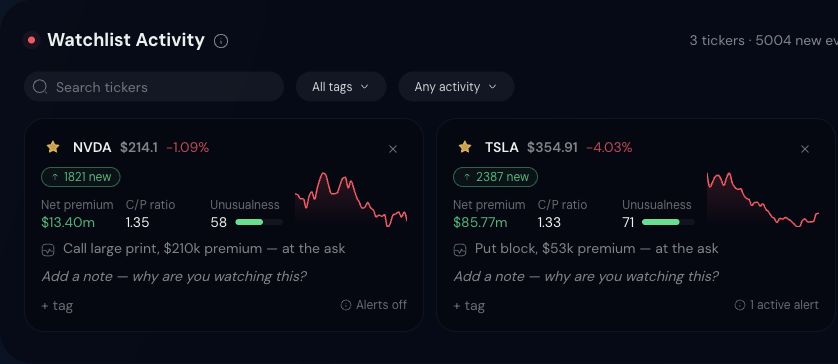
Swipe the capture to inspect it, or tap to open full-size.
The product view includes ticker context, a place for your research note, tags and visible alert status. No sample notification has been invented for this page.
My Market product capture · October 17, 2026 PKT · saved view, not live data. Open the image for full-size detail.
Read the capture · 01
Focus the list
Search watched tickers and use the visible tag and activity filters to narrow the research view.
Read the capture · 02
Keep your reason attached
Notes and tags sit beside each ticker. Record the question you are investigating, then revisit it against the later activity.
Read the capture · 03
Check notification controls
A card’s alert status is not a delivery receipt. Review conditions, enabled state and available delivery settings before relying on an alert.
Keep the example in context. This screenshot demonstrates the workspace, not notification delivery. Delivery depends on available controls, account settings and connectivity. Watchlists and alerts do not place trades.
What you can investigate
Less guessing. More context to inspect.
A strip you come back to
Review each watched ticker’s price context and displayed flow metrics, then open its ticker view when a change deserves more attention.
Alerts on your rules
Review available conditions, enabled state and delivery controls in your account. A displayed alert status does not confirm notification delivery.
Notes and tags attached
Why you watch a name lives next to what it did today — the context survives between sessions.
Your first session
A practical place to start.
Use My Market for your watchlist and the dashboard's workspace controls to organize research. Review alert controls in your account before relying on a notification.
- 01
Add the names you actually watch
Add the tickers you research and organize them with notes and tags. Free and Pro include the same product tools.
- 02
Set a rule
Review the alert controls available in your account and choose a condition relevant to your research.
- 03
Verify before relying on it
Confirm that your selected condition and delivery method work in your account, then return to the related tape or chart for context.
Continue the research
Next: Live order flowQualifying options activity as it prints — ticker, strike, premium, and execution style.
Go deeper when you need to
The fields, without the mystery.
How to read the fields
- Ticker context
- Keep price, session change and flow context tied to the same symbol and timestamp.
- Notes and tags
- Record why a name is on your list so later activity can be compared with the original research question.
- Alert conditions
- Check the condition, enabled state and available delivery controls. Free data remains 15 minutes delayed; an alert is not a real-time execution service.
Connect the steps
Build a focused list, add a research note, and confirm an alert's behavior in your account before depending on it. Return to the underlying print or chart when reviewing an event.
What this cannot tell you
Notifications can depend on account settings, connectivity and delivery availability. Neither a watchlist nor an alert places an order or supplies a personalized trade recommendation.
Explore the options Learn guidesDo I need Pro to use this?
Free and Pro include the same product tools. Free market data is 15 minutes delayed; Pro market data is real-time. A seven-day Pro trial is available. An account is needed for the dashboard. The public single-ticker scanner can be used without one.
See Free and Pro plansExplore the tools with your own research question.
Free and Pro include the same product tools. Free market data is 15 minutes delayed; Pro market data is real-time. A seven-day Pro trial is available.